
2 min read
SwiftUI Canvas, Path, Shape, and View
Here are some personal notes about the differences between some basic elements of SwiftUI:
- a Canvas: a struct supporting immediate mode drawing
- a Path: a struct defining the outline of a 2D shape
- a Shape: a protocol/type for an Animatable View defining A 2D shape that you can use when drawing a view
- a View: a protocol/type that represents part of your interface and provides modifiers
Here’s my Playground:
import SwiftUI
import PlaygroundSupport

struct CanvasPathShapeView: View {
    var body: some View {
        VStack {
            HStack {
                VStack {
                    Text("Canvas")
                    Canvas { context, size in
                        context.stroke(
                            Path(ellipseIn: CGRect(origin: .zero, size: size)),
                            with: .color(.green),
                            lineWidth: 4)
                    }
                    .frame(width: 300, height: 200)
                    .border(Color.blue)
                }
                VStack {
                    Divider()
                    Text("Path")
                    Path(ellipseIn: CGRect(origin: .zero, size: CGSize(width: 300, height: 200)))
                        .stroke(.green, lineWidth: 4)
                        .border(Color.blue)
                        .frame(width: 300, height: 200)
                }
            }
            HStack {
                VStack {
                    Divider()
                    Text("Shape")
                    EllipsePath()
                        .stroke(.green, lineWidth: 4)
                        .border(Color.blue)
                        .frame(width: 300, height: 200)
                }
                VStack {
                    Divider()
                    Text("View")
                    EllipseView()
                        .frame(width: 300, height: 200)
                }
            }
        }
        VStack {
            Divider()
            Text("Path with size < frame size")
            Path(ellipseIn: CGRect(origin: .zero, size: CGSize(width: 150, height: 100)))
                .stroke(.green, lineWidth: 4)
                .border(Color.blue)
                .frame(width: 300, height: 200)
        }
        VStack {
            Divider()
            Text("Path without frame")
            Path(ellipseIn: CGRect(origin: .zero, size: CGSize(width: 150, height: 100)))
                .stroke(.green, lineWidth: 4)
                .border(Color.blue)
        }
    }
}

struct EllipsePath: Shape {
    func path(in rect: CGRect) -> Path {
        return Path(ellipseIn: rect)
    }
}

struct EllipseView: View {
    var body: some View {
        GeometryReader { geometry in
            Path(ellipseIn: CGRect(origin: .zero, size: CGSize(width: geometry.size.width, height: geometry.size.height)))
                .stroke(.green, lineWidth: 4)
                .border(Color.blue)
        }
    }
}

let view = CanvasPathShapeView()
PlaygroundPage.current.setLiveView(view)
And the result:
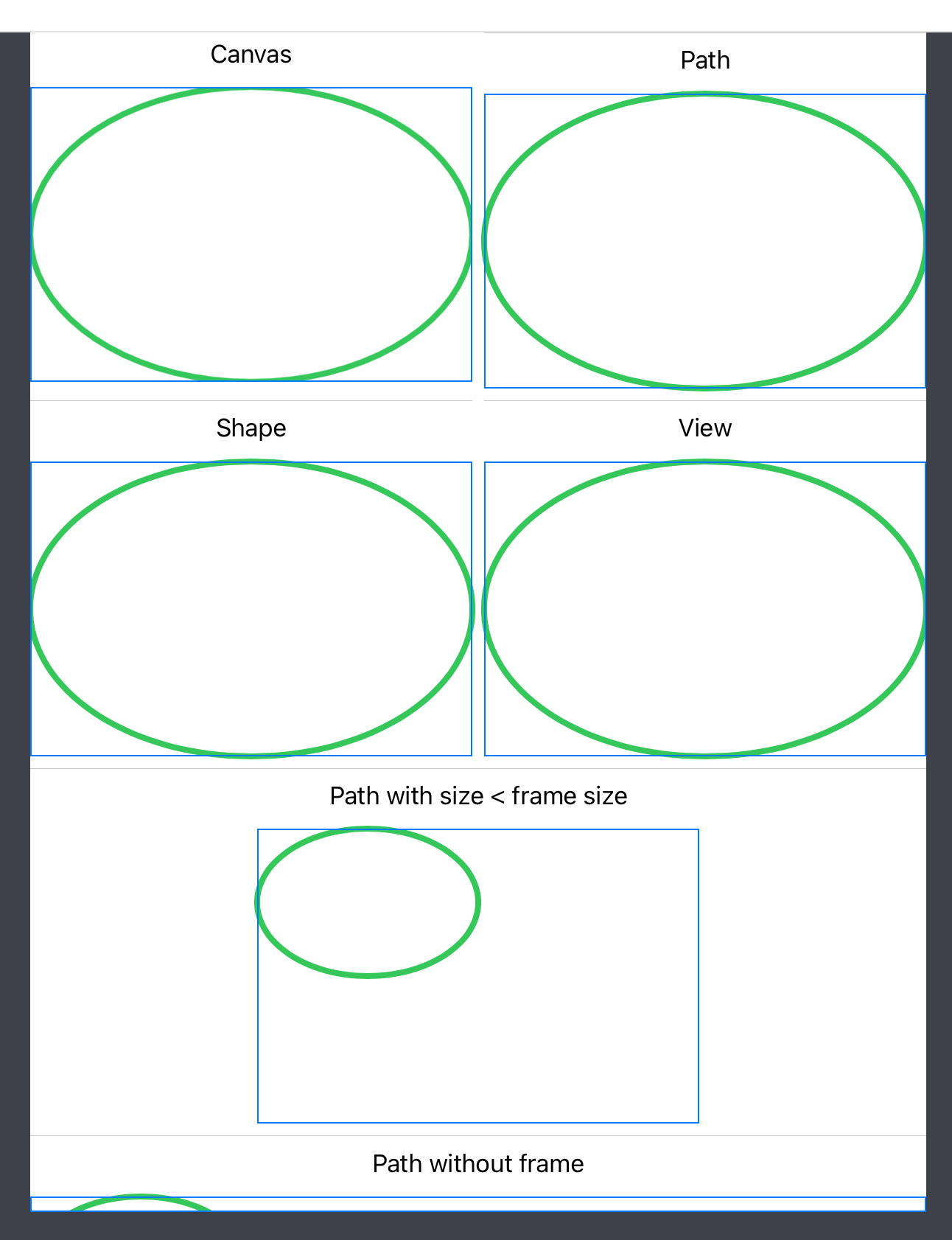
Some notes:
- Canvas: you can see that the ellipse is clipped, which is hinted at by the documentation: “Use a canvas to draw rich and dynamic 2D graphics inside a SwiftUI view”
- Path with size < frame size: Canvas, Shape, and View use size readers to match the frame they’re in; here, unsurprisingly, the Path here won’t expand to fill the frame
- Path without frame: a Path has no intrinsic size, so without a frame matching its target size, it’s clipped
- Apple’s notes about the Canvas limitations are worth being aware of
- In Apple’s tutorial Drawing Paths and Shapes, they seem to favor using a View with a GeometryReader as I did in EllipseView.
🫵 What do you make of this?
I’d be curious to hear your thoughts, feedback, and stories on that topic.
Please comment on this tweet, or simply RT/like it for your followers to see.
I played with Canvas, Path, Shape, and View.May 17, 2022 · View on X
Not much of an article or a thread, but maybe you'll find that interesting still 🤷♂️https://t.co/6vHpLnEM8g